-

کجای این متن قرار بدم قرار دادم سایت دیگه بالا نیومد
##
# @package Joomla
# @copyright Copyright (C) 2005 - 2013 Open Source Matters. All rights reserved.
# @license GNU General Public License version 2 or later; see LICENSE.txt
##
##
# READ THIS COMPLETELY IF YOU CHOOSE TO USE THIS FILE!
#
# The line just below this section: 'Options +FollowSymLinks' may cause problems
# with some server configurations. It is required for use of mod_rewrite, but may already
# be set by your server administrator in a way that dissallows changing it in
# your .htaccess file. If using it causes your server to error out, comment it out (add # to
# beginning of line), reload your site in your browser and test your sef url's. If they work,
# it has been set by your server administrator and you do not need it set here.
##
## Can be commented out if causes errors, see notes above.
Options +FollowSymLinks
## Mod_rewrite in use.
RewriteEngine On
## Begin - Rewrite rules to block out some common exploits.
# If you experience problems on your site block out the operations listed below
# This attempts to block the most common type of exploit `attempts` to Joomla!
#
# Block out any script trying to base64_encode data within the URL.
RewriteCond %{QUERY_STRING} base64_encode[^(]*\([^)]*\) [OR]
# Block out any script that includes a <script> tag in URL.
RewriteCond %{QUERY_STRING} (<|%3C)([^s]*s)+cript.*(>|%3E) [NC,OR]
# Block out any script trying to set a PHP GLOBALS variable via URL.
RewriteCond %{QUERY_STRING} GLOBALS(=|\[|\%[0-9A-Z]{0,2}) [OR]
# Block out any script trying to modify a _REQUEST variable via URL.
RewriteCond %{QUERY_STRING} _REQUEST(=|\[|\%[0-9A-Z]{0,2})
# Return 403 Forbidden header and show the content of the root homepage
RewriteRule .* index.php [F]
#
## End - Rewrite rules to block out some common exploits.
## Begin - Custom redirects
#
# If you need to redirect some pages, or set a canonical non-www to
# www redirect (or vice versa), place that code here. Ensure those
# redirects use the correct RewriteRule syntax and the [R=301,L] flags.
#
## End - Custom redirects
##
# Uncomment following line if your webserver's URL
# is not directly related to physical file paths.
# Update Your Joomla! Directory (just / for root).
##
# RewriteBase /
## Begin - Joomla! core SEF Section.
#
RewriteRule .* - [E=HTTP_AUTHORIZATION:%{HTTP:Authorization}]
#
# If the requested path and file is not /index.php and the request
# has not already been internally rewritten to the index.php script
RewriteCond %{REQUEST_URI} !^/index\.php
# and the request is for something within the component folder,
# or for the site root, or for an extensionless URL, or the
# requested URL ends with one of the listed extensions
RewriteCond %{REQUEST_URI} /component/|(/[^.]*|\.(php|html?|feed|pdf|vcf|raw))$ [NC]
# and the requested path and file doesn't directly match a physical file
RewriteCond %{REQUEST_FILENAME} !-f
# and the requested path and file doesn't directly match a physical folder
RewriteCond %{REQUEST_FILENAME} !-d
# internally rewrite the request to the index.php script
RewriteRule .* index.php [L]
#
## End - Joomla! core SEF Section.
جهت مشاهده لینک ها باید ثبت نام کنید یا لاگین کنید.
-
-
01-27-2016 04:36 PM
# ADS
تبلیغات در جوملا فارسی

-
در آخر فایل بذارید!
مشکل احتمال بسیار زیاد از پیکربندی نادرست از سوی هاستینگ شما هست!
ویرایش توسط mediawiki : 01-27-2016 در ساعت 05:17 PM
جهت مشاهده لینک ها باید ثبت نام کنید یا لاگین کنید.
-
-
در آخر فایل اضافه کردم ولی دیگه سایت بالا نمیاد
این ارورو میده
Internal Server Error
The server encountered an internal error or misconfiguration and was unable to complete your request.
Please contact the server administrator to inform of the time the error occurred and of anything you might have done that may have caused the error.
More information about this error may be available in the server error log.
Web Server at technoelectric.ir
جهت مشاهده لینک ها باید ثبت نام کنید یا لاگین کنید.
-
-
آخرین کدی که به شما گفتم اضافه کنید را پاک کنید، تا بررسی کنم!
جهت مشاهده لینک ها باید ثبت نام کنید یا لاگین کنید.
-
-
این کارو کردم الان gzip رو روشن میکنم دیگه اصلا سایت بالا نمیاد
جهت مشاهده لینک ها باید ثبت نام کنید یا لاگین کنید.
-
-
کش مرورگر خودتان خالی کنید، من سایت شما را می بینم مشکلی ندارد!
جهت مشاهده لینک ها باید ثبت نام کنید یا لاگین کنید.
-
-

نوشته اصلی توسط
mediawiki
[مهمان/کاربر گرامی برای دیدن لینک ها ابتدا باید عضو سایت شوید و لاگین کنید برای ثبت نام اینجا کلیک کنید]
کش مرورگر خودتان خالی کنید، من سایت شما را می بینم مشکلی ندارد!
بله الان سایت بالا هست خود منم میبینم به علت اینه که gzip را خاموش کردم
این اروری که براتون ارسال کردم از چی می باشد و می شود رفع شود
می خواهید از تنظیمات هاست خود اسکرین شات بگیرم بفرستم ببینید مشکل از کجاست؟
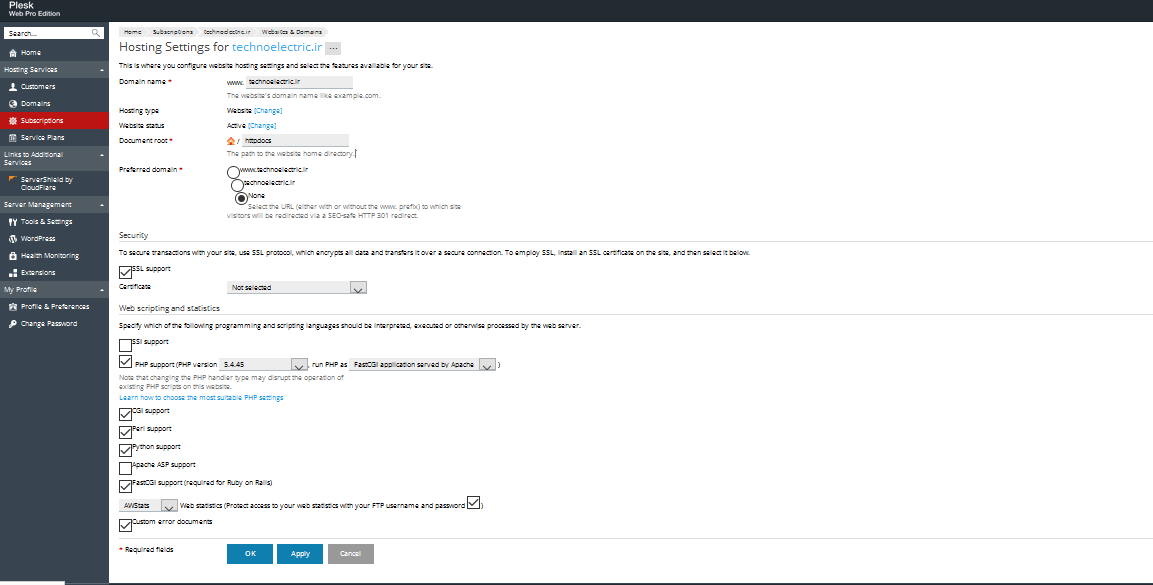
ویرایش توسط technoelectric : 01-27-2016 در ساعت 08:36 PM
جهت مشاهده لینک ها باید ثبت نام کنید یا لاگین کنید.
-
-
سلام، شما باید تیک گزینه های CGI Support ، Perl Support ،Python Support و FastCGI را بردارید، همچنین در گزینه PHP Support باید وی آخرین نسخه PHP (اگر وجود دارد) تنظیم کنید. شما از SSL هم استفاده نمی کنید پس تیک گزینه SSL Support را هم بردارید. در پایان هم تغییرات رو ذخیره کنید.
جهت مشاهده لینک ها باید ثبت نام کنید یا لاگین کنید.
-
-
سلام
این کار ها رو انجام دادم ظاهرا مشکل ارور برطرف شده است و دیگه نمیاد
ولیکن به نظر شما دلیل اینکه GZIP j تو مدیریت محتوای جوملا روشن میشه دیگه سایت بالا نمیاد چی می باشد؟
و اینکه برای بهبود کارکرد فنی سایت چه کارهایی را انجام بدم
جهت مشاهده لینک ها باید ثبت نام کنید یا لاگین کنید.
-
-
باید دسترسی بدهید تا بررسی کنم، نمی توان بدون داشتن اطلاعات، در این مورد صحبت کرد!
بنده فقط یک چیز به شما میگم و در کار کردن با جوملا باید آویزه گوشتان کنید از افزونه و قالب های جانبی و غیر از هسته جوملا خیلی کم استفاده کنید.
امیدوارم موفق باشید! 
ویرایش توسط mediawiki : 01-28-2016 در ساعت 11:49 AM
جهت مشاهده لینک ها باید ثبت نام کنید یا لاگین کنید.
-


 پاسخ با نقل قول


علاقه مندی ها (Bookmarks)